NPS (National Pension System) has been getting better from taxation standpoint with each Union Budget. Last year, investors got additional tax benefit of Rs 50,000 under Section 80CCD (1B). This year, 40% of maturity corpus at the time of retirement was made exempt from income tax.
There has been a lot of buzz among tax-payers this year about investing in NPS. If you have decided to invest in NPS, the next step is how to invest in NPS. For that you need to open NPS account. There are many ways to open NPS account. In this post, I will write about how to open NPS account online using your Aadhaar card.
Please understand this is not a recommendation to invest in NPS. You must first figure out whether NPS fits in your overall scheme of things and then invest. Do not invest in NPS merely to save taxes.
Must Read: NPS Tax Benefits and Tax Treatment at Maturity
How to open NPS account?
There is an offline process where you need to visit point of presence (POP-POP-SP) and complete the formalities. Branches of most major banks will figure in the list. For the net banking generation, this is asking for too much. There is good news for such subscribers. You can open NPS account online sitting from the comfort of your home. And there are many ways to open an account online. It does not take much time.
There are many ways to open account online.
- You can go to portals such as ICICIDirect and open NPS account online.
- You can go to eNPS Portal and open your account in two ways.
- Using a combination of PAN and bank account details
- Using Aadhaar details
I tried to open an account using Aadhaar details (I stopped short of opening the account). The procedure was quite simple. In this post, I will list down the steps needed to open an account online using your Aadhaar card through eNPS portal.
How to open NPS Account Online using Aadhaar card?
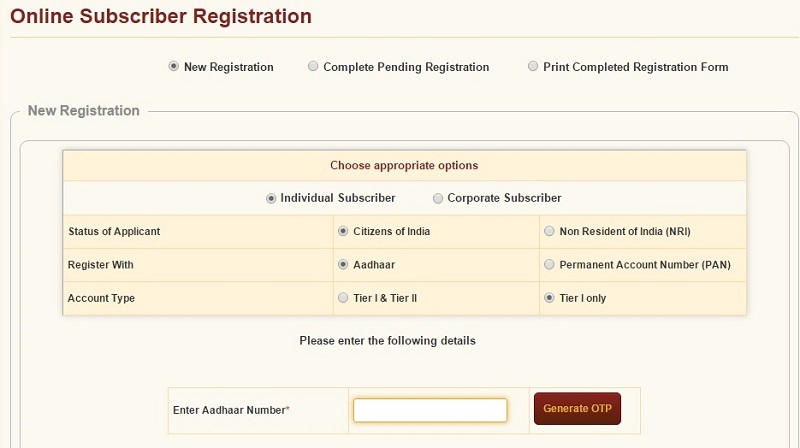
Step 1: Go to eNPS Portal. Select Registration Option.
Step 2: You will asked to enter your Aadhaar Number. You will get a One Time Password (OTP) on Aadhaar registered mobile number. I chose only Tier-1. There is no need to invest in Tier-2 account of NPS.
Step 3: You keep providing details as requested. Most details will be automatically fetched from your Aadhaar information. Enter Personal, contact, bank account and nomination details. You will be asked to enter bank account details. Piece of cake.
Step 4: You will be asked to select Pension Fund Manager. You will be asked to select an investment option (Auto or Active). If you select Active, you will be further asked to specify allocation to Equity (E), Corporate Debt (C) and Government Debt securities (G).
For more on Auto or Active option, go through this post. This is an old post but captures the investment options well.
Step 5: Upload Signature and photograph. Photograph from Aadhaar card will be uploaded by default. If you wish, you can upload a different photograph. You will also be required to upload copy of your signature. You can sign on a blank sheet. Take a photograph or scan it. Upload the signature.
Step 6: You can go ahead and make the initial contribution. Minimum contribution is Rs 500. You can pay through Net Banking, debit card or credit card.
Your PRAN will be generated instantly. PRAN allocation letter and the welcome kit will be sent to your address in a few days. Do note PRAN will be generated only when you make the initial contribution.
Step 7: The process is still not complete. You will have to take out printout of this application form generated online and send to CRA (Central Recordkeeping Agency). The form should reach CRA within 90 days or else the account will be temporarily frozen. The account will be re-activated on receipt of form.
Even though the entire process does not much time, you do have an option to save the form and access it using the acknowledgement number. The acknowledgement number will be sent to you once you enter OTP (one-time password). So, if you can’t complete the process in one sitting, you can save the form and finish registration later.
Must Read: Should you invest in NPS for additional Rs 50,000 tax benefit?
What are the charges if I invest online in NPS?
Let’s assume you are making a contribution of Rs 50,000 in Tier-I account. You will have to pay:
- One-time Initial Subscriber registration charge of Rs 125. This charge is not applicable if you are opening account through e-NPS using Aadhaar. This charge will be applicable if you use a combination of PAN Card and Bank Account or if you are opening account through ICICIDirect.
- Contribution charge of Rs 125 (0.25% of Rs 50,000). This charge is also not applicable in case of eNPS (Aadhaar or PAN and bank account combination).
So, essentially, none of the above two charges are applicable if you are opening account through eNPS using Aadhaar card.
Do note I am talking only about the upfront charges. Do go through detailed charge structure on NPS website.
In case of eNPS, there will be payment gateway charges. This will be for each contribution you make through eNPS portal.
- Net Banking: Rs 0.6
- Debit card: 0.8% of the transaction amount
- Credit card: 0.9% of the transaction amount
Service tax shall be levied on the above charges.
Try making payment through Net Banking otherwise eNPS portal is quite expensive. An additional point to note is that a few banks were missing from the list of banks for Net Banking. ICICI Bank and HDFC Bank are notable omissions. Respective banks can levy additional convenience fee.
If you have Aadhaar card and can pay through Net Banking, you can open NPS account for a paltry 60 paise (plus service tax). If you had opened NPS account through any Point of Presence, you would have paid Rs 286.5 (Rs 250 + Service Tax).
A few Snapshots (NPS Account with Aadhaar Card)